Close
(0) Shopping cart
You have no items in your shopping cart.
Shopping Categories
    Filters
    Preferences
    Search
    Monday, December 8, 2025 7:26:48 PM

    New 1/ 2 hp Single Phase VFD Replacement Showing E12 Error

    21 days ago
    #604 Quote
    Hi, I am having problems with the replacement of a bad 1/2 hp single phase VFD with a new one (SKU: GK3000-1S0004) of the same type. The new one received is not working: the motor is not running, and always receiving E12 error on the LED display. It seems that the new parameters are different from the old one. The app implies a 230 VAC fan motor (1/3 HP) working at 2 different speeds based on 45Hz to 75Hz received from the VFD and controlled by x1-com contacts.(default 45HZ)
    I am using the new parameters different for factory one:
    P0.01 =1
    P0.02 = 45Hz
    P0.03= 1
    P0.05=75Hz
    P0.06=75hz
    P0.07=45Hz
    P3.00=1
    I have checked: input voltage is ok, (L1-L2) all connections are ok, motor is ok in regular AC input, X1-COM ok.
    What is the problem? Thank you!
    0

    21 days ago
    #605 Quote
    Rhett wrote:
    Hi, I am having problems with the replacement of a bad 1/2 hp single phase VFD with a new one (SKU: GK3000-1S0004) of the same type. The new one received is not working: the motor is not running, and always receiving E12 error on the LED display. It seems that the new parameters are different from the old one. The app implies a 230 VAC fan motor (1/3 HP) working at 2 different speeds based on 45Hz to 75Hz received from the VFD and controlled by x1-com contacts.(default 45HZ)
    I am using the new parameters different for factory one:
    P0.01 =1
    P0.02 = 45Hz
    P0.03= 1
    P0.05=75Hz
    P0.06=75hz
    P0.07=45Hz
    P3.00=1
    I have checked: input voltage is ok, (L1-L2) all connections are ok, motor is ok in regular AC input, X1-COM ok.
    What is the problem? Thank you!

    Hi, Rhett, E12 error is the output phase loss protection.
    If the fan you connect is a single-phase motor, please set PA.13=0 (output phase loss prohibited), and test again.
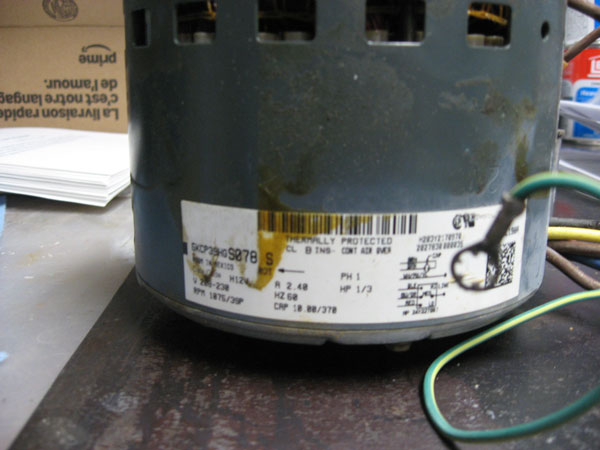
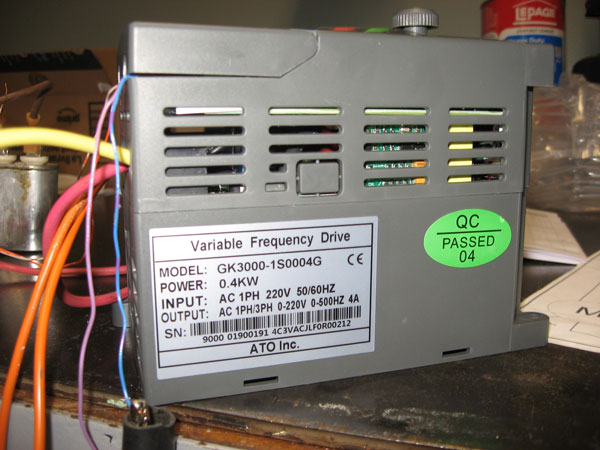
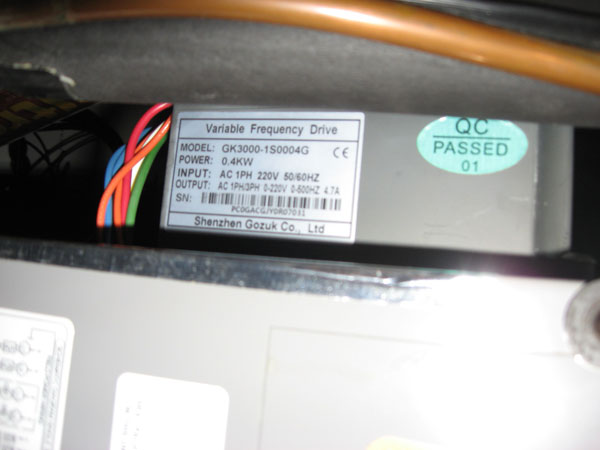
    If there is still a problem, provide us with pictures of your VFD and motor nameplate label for confirmation.
    0
    ATO.com
    21 days ago
    #606 Quote
    ATO wrote:
    Hi, Rhett, E12 error is the output phase loss protection.
    If the fan you connect is a single-phase motor, please set PA.13=0 (output phase loss prohibited), and test again.
    If there is still a problem, provide us with pictures of your VFD and motor nameplate label for confirmation.

    As shown in the picture, I have used an ATO VFD driving my furnace 2-speed fan for the last 2 years. Recently, it was burned by an input surge. I have received a new one. and was surprised by all the parameter differences to use in the new unit. The test bench uses a single-phase motor of the same type used in the furnace.
    Here are parameters from the OLD unit:
    P0.01 = 2: Control by digital setting
    p0.02 = 45 Hz: Default running freq
    p0.03 = 1: Terminal control mode selected
    p0.04 = 11: Forward and reverse permitted
    p0.06 = 75Hz : Max freq
    p0.07 = 75 Hz Basic freq
    p0.17 = 1.0 Acc time Sec.
    p0.19 = 75 Hz Upper limit Freq
    p0.20 = 45 Hz Lower limit Freq
    p3.26 = 75 Hz Multi-stage Freq
    p4.0 = 1: Multi Stage selected by x1
    I cannot find equivalent functionality within the parameters available in the new unit. Please help with that issue.


    0
    21 days ago
    #607 Quote
    Rhett wrote:
    As shown in the picture, I have used an ATO VFD driving my furnace 2-speed fan for the last 2 years. Recently, it was burned by an input surge. I have received a new one. and was surprised by all the parameter differences to use in the new unit. The test bench uses a single-phase motor of the same type used in the furnace.
    Here are parameters from the OLD unit:
    P0.01 = 2: Control by digital setting
    p0.02 = 45 Hz: Default running freq
    p0.03 = 1: Terminal control mode selected
    p0.04 = 11: Forward and reverse permitted
    p0.06 = 75Hz : Max freq
    p0.07 = 75 Hz Basic freq
    p0.17 = 1.0 Acc time Sec.
    p0.19 = 75 Hz Upper limit Freq
    p0.20 = 45 Hz Lower limit Freq
    p3.26 = 75 Hz Multi-stage Freq
    p4.0 = 1: Multi Stage selected by x1
    I cannot find equivalent functionality within the parameters available in the new unit. Please help with that issue.


    Dear Rhett,
    Thanks for sharing the information. Our new version of VFD can also achieve 2-speed control.
    You can refer to the parameter setting instructions below:
    Assuming that two physical self-locking buttons are used to realize the pump running at two speeds, the default speed of speed 1 is 45Hz, and the default speed of speed 2 is 75Hz.
    The correct wiring and parameter settings are as follows:
    1. About wiring:
    A. Please use a self-locking button switch to connect the X1-COM terminal as the VFD start signal.
    B. Please use a self-locking button switch to connect the X4-COM terminal as the VFD speed selection signal (when X4 and COM are connected, speed=75Hz, the physical button will run the frequency at 75Hz.
    2. VFD setting parameters are as follows:
    P0.01=6 (frequency comes from multiple speeds given)
    P0.03=1 (command operation of VFD terminal)
    P0.05=P0.06=75Hz (maximum frequency)
    P3.00=1 (define X1 terminal as start signal)
    P3.03=12 (define X4 terminal as multi-stage speed 1)
    Pb.00= 45Hz (multi-stage speed 0, default speed 1)
    Pb.01=75Hz (1 stage speed, when X4 and COM are connected, speed 2=60Hz)
    0
    ATO.com
    21 days ago
    #608 Quote
    ATO wrote:
    Dear Rhett,
    Thanks for sharing the information. Our new version of VFD can also achieve 2-speed control.
    You can refer to the parameter setting instructions below:
    Assuming that two physical self-locking buttons are used to realize the pump running at two speeds, the default speed of speed 1 is 45Hz, and the default speed of speed 2 is 75Hz.
    The correct wiring and parameter settings are as follows:
    1. About wiring:
    A. Please use a self-locking button switch to connect the X1-COM terminal as the VFD start signal.
    B. Please use a self-locking button switch to connect the X4-COM terminal as the VFD speed selection signal (when X4 and COM are connected, speed=75Hz, the physical button will run the frequency at 75Hz.
    2. VFD setting parameters are as follows:
    P0.01=6 (frequency comes from multiple speeds given)
    P0.03=1 (command operation of VFD terminal)
    P0.05=P0.06=75Hz (maximum frequency)
    P3.00=1 (define X1 terminal as start signal)
    P3.03=12 (define X4 terminal as multi-stage speed 1)
    Pb.00= 45Hz (multi-stage speed 0, default speed 1)
    Pb.01=75Hz (1 stage speed, when X4 and COM are connected, speed 2=60Hz)

    Thank you for the solution provided. It works fine.
    0