
How to Control a Three-Phase Motor Using a VFD Panel
A variable frequency drive (VFD) can control a three-phase induction motor through its built-in control panel. In this mode, the operator can start and stop the motor using the panel keys and adjust the frequency reference with the drive's adjustment knob. This guide uses the ATO GK3000-CT VFD as an example to demonstrate how to configure panel control for a three-phase induction motor, covering basic wiring, parameter programming, and an operating test.
- System Configuration
- Wiring
- Parameter Programming
- Testing
- Key Points for VFD Panel Control
- Conclusion
I. System Configuration
The basic setup requires two main devices:
In panel control mode, the RUN and STOP/RESET keys on the VFD provide the operating commands. The built-in adjustment knob is used to change the frequency reference, allowing the motor speed to be adjusted through the drive panel.
II. Wiring
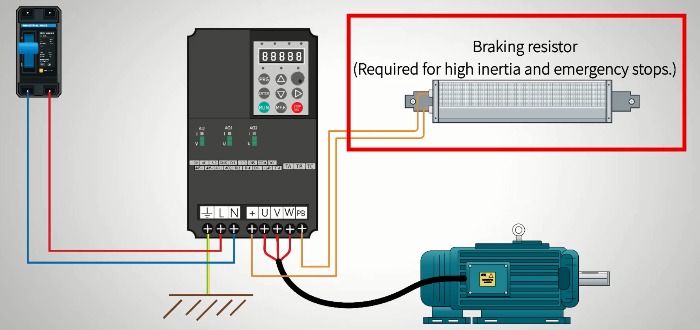
For the configuration shown in the demonstration:
- Connect the 220 V AC input to terminals L and N.
- Connect protective earth to PE.
- Connect the motor phase wires to output terminals U, V, and W.
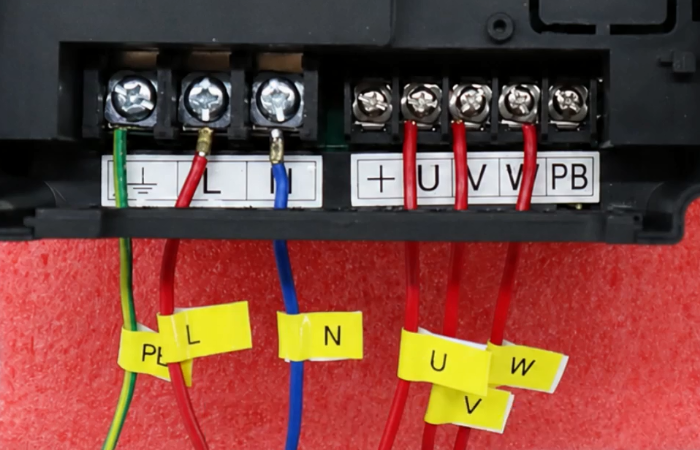
The supply voltage and terminal arrangement must be verified against the manual for the exact drive model before power is applied.
When Is a Braking Resistor Needed?
A braking resistor may be required when an application involves substantial inertia or needs rapid deceleration. It connects to the VFD's designated braking terminals and helps dissipate braking energy. The correct resistor specifications and terminal connections depend on the drive model and application. Refer to the user manual before selecting or installing a braking resistor.
III. Parameter Programming
After completing the wiring, configure the VFD parameters for the intended control method and motor.
Step 1: Enter the Parameter Menu
Press PRG to enter the parameter menu. Use the UP and DOWN keys to browse parameters and change their values.
Step 2: Basic Settings
- Press RIGHT to select the digit to change, then press ENTER to save the setting and advance to the next parameter.
- Repeat for all required P0 parameters. Once finished, press PRG to exit.
These values should be adjusted according to the motor, load inertia, and application requirements.
Step 3: Motor Parameters
- Enter parameter Group P1.
- Configure the motor-specific parameters using the actual motor nameplate data and the applicable GK3000-CT parameter table.
- Check the settings before proceeding to the operating test.
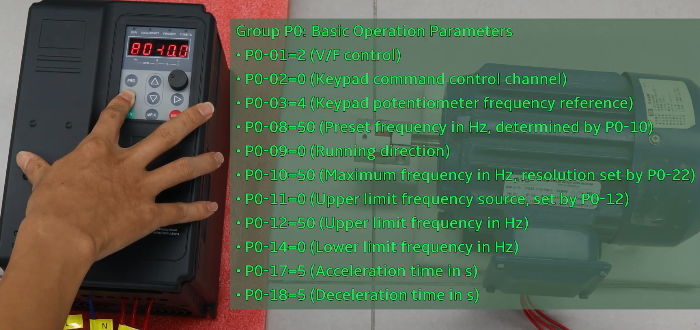
The required motor parameter values depend on the motor being used.
IV. Testing
After completing the wiring and parameter settings, test the VFD to verify that the panel controls and frequency adjustment work correctly.
- Start the Motor: Press RUN on the VFD front panel. The motor starts according to the configured acceleration time.
- Adjust the Motor Speed: Turn the built-in adjustment knob to change the frequency reference. The motor speed changes accordingly as the output frequency varies.
- Stop the Motor: Press STOP/RESET. The VFD reduces the output frequency according to the programmed deceleration time until the motor stops.
If the motor does not respond as expected, stop the test and check the wiring, control mode, parameter settings, and motor data against the GK3000-CT user manual.
V. Key Points for VFD Panel Control
Before putting the system into regular operation, keep these points in mind:
- Verify the wiring: Confirm the AC input, protective earth, and motor output connections before powering on.
- Use the correct motor data: Configure the motor parameters according to its nameplate and the drive's parameter table.
- Choose suitable ramp times: Acceleration and deceleration settings should match the load and operating requirements.
- Check braking requirements: Applications with high inertia or demanding stopping requirements may need a properly selected braking resistor.
- Follow safety procedures: Disconnect power before making wiring changes and follow the manufacturer's instructions for installation, operation, and maintenance.
VI. Conclusion
The VDF panel control provides a simple way to operate three-phase induction motors. With proper wiring and parameter setup, users can control motor start, stop and speed via the front panel. This method is ideal for simple motor control scenarios. Click the video link below to watch the detailed setup and operation process. Visit ATO.com to discover more VFDs and industrial motor control components.
