
What is a Laser Module?
A laser module is a compact optoelectronic device that integrates a laser diode, driver circuitry, optical lenses, and a thermal management system. Designed as a stable, plug-and-play light source, it is widely used in industrial automation, precision machining, and machine vision. As a cornerstone of modern photonics, its highly integrated design simplifies system development while ensuring consistent laser output in demanding environments.
If you are in the engineering R&D or procurement phase, choosing the right component can be challenging. This guide breaks down the essential parameters, control modes, and application scenarios of laser modules to help you find the perfect match for your project requirements.
Contents:
- What are the Core Components of a Laser Module?
- What are the Critical Parameters of a Laser Module?
- How to Choose the Ideal Laser Module for Your Project?
- High-Power Laser Module Safety: What You Must Do
- Industrial Applications of Laser Modules
- Conclusion
- FAQs
What are the Core Components of a Laser Module?
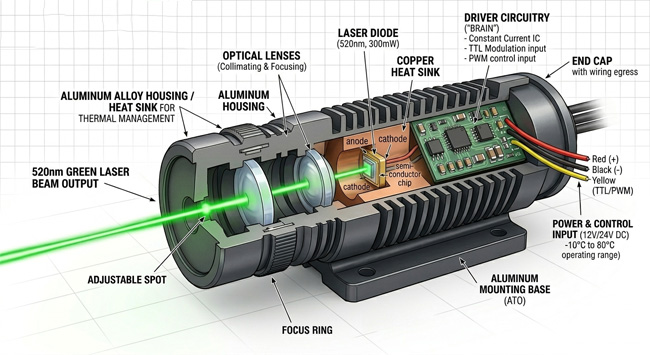
A fully functional industrial laser module consists of four core components:
- Laser Diode: The primary semiconductor light source that generates coherent optical radiation. It dictates the output wavelength and establishes the baseline optical power of the system.
- Driver Circuitry: The electronic control unit that regulates the operating current of the laser diode. It ensures stable, constant-current operation and supports external modulation signals such as TTL or PWM for dynamic output control.
- Optical Lenses: The beam-shaping assembly that collimates or focuses the raw laser output into a defined spatial profile, such as a dot, line, or custom spot.
- Housing & Thermal Management: The mechanical protective enclosure, typically constructed from aluminum alloy. It serves as a heatsink to maintain safe diode temperatures within a standard industrial operating range of -10°C to 80°C.
What are the Critical Parameters of a Laser Module?
Choosing the right industrial laser module comes down to checking four basic features. These four points decide what materials you can work on, how fast the machine runs, and how you control the light.
1. Wavelength: How the Laser Fits Different Materials
Wavelength decides how the laser works on materials and determines the light color. Different materials absorb different laser colors, which changes the cutting and marking results.
| Classification | Common Wavebands | Core Characteristics | Typical Application Scenarios |
| Violet / Blue-Violet | 405nm | High photon energy; highly reactive to photochemical processes. | SLA 3D printing (resin curing), photolithography, fluorescence excitation. |
| Pure Blue | 450nm | Exceptionally high absorption in organics; capable of cutting at high power levels. | Laser engraving/cutting (wood, acrylic, leather), metal surface marking. |
| Visible Light | 520nm / 650nm | High human eye sensitivity; provides clear visual alignment. | Construction measurement, machine vision alignment, laser line leveling. |
| Infrared (IR) | 808nm / 850nm | Strong penetration, pronounced thermal effects, invisible to the naked eye. | Night vision illumination, medical therapy, pumping sources, specialized material processing. |
Wavelength Rule: You must match the laser wavelength to how the material absorbs the light. The wrong color means the laser will pass right through or just burn the surface black without cutting.
2. Power Output: Light Strength and Working Speed
Laser power is measured in milliwatts (mW) or watts (W). It decides how much heat the laser puts onto the material surface.
- Milliwatt Range (1mW – 500mW): These low-power laser modules are only built for pointing, positioning, and triggering sensors. They do not have enough heat energy to cut, mark, or change solid materials.
- Watt Range (1W – 40W+): High-power laser modules built for actual industrial cutting and engraving. These multi-diode blue lasers pack enough raw heat to quickly melt or vaporize wood and plastics during manufacturing.
3. Control Modes: TTL vs. PWM Laser Switching
Control modes decide how the machine turns the laser on and off to adjust the cutting depth and image shading.
| Control Mode | Working Principle | Core Advantages | Ideal Scenarios |
| TTL (Digital/Switching) | Controls rapid laser toggling (ON/OFF) via high/low voltage levels. | Ultra-fast response times; ideal for high-frequency triggering. | Laser dotting, sensor triggering, high-speed scanning. |
| PWM (Analog/Modulation) | Controls average output power by adjusting the pulse duty cycle. | Enables linear adjustment of laser intensity and depth. | Grayscale laser engraving, depth-controlled cutting, marking. |
Pro tip: TTL control only works as a basic ON/OFF switch, while PWM control works like a dimmer switch to let you engrave detailed grayscale photos.
4. Beam Delivery: Free-Space vs. Fiber-Coupled Light Output
The output setup decides how the laser light travels out of the box and fits into your machine rail layout.
| Output Configuration | Core Advantages | Limitations | Recommended Applications |
| Free-Space | Simple architecture, cost-effective, and easy to install. | Limited transmission distance; requires a direct, linear optical path. | Standard engraving heads, linear alignment, direct-irradiation setups. |
| Fiber-Coupled | Exceptional beam quality, flexible routing, and high EMI resistance. | Higher relative cost; involves complex coupling alignment. | Robotic arm integration, intricate/compact precision instruments, long-distance beam delivery. |
How to Choose the Ideal Laser Module for Your Project?
To pick the right laser module, you just need to check three things: what material you are cutting, your factory voltage, and the physical space inside your machine.
1. Match the Light to Your Material
Different materials react to different laser colors. If you work with wood, leather, or plastics, pick a 450nm blue laser because these materials absorb blue light fast. If you try to use a blue laser on shiny metals, the light will just bounce off without doing any work; metals need infrared (IR) light instead.
2. Check Your Power and Heat Setup
Don't buy a module before checking your shop's power supply. Most standard laser boxes run on 12V or 24V DC power, so make sure they match. Also, high-power lasers get hot quickly. Make sure your setup has enough open airflow or active cooling fans, or the laser will overheat and burn out early.
3. Make Sure It Fits Your Machine
Always measure the physical size and screw hole patterns before you order. If you have a small, tight machine frame, space is everything. Also, if your laser head has to constantly move around on a spinning robotic arm, skip the stiff setups and get a fiber-coupled laser so the light cable can bend freely.
High-Power Laser Module Safety: What You Must Do
Lasers between 10W and 40W+ are dangerous tools. They can blind you instantly and start fires in a split second if you are not careful.
- Protect Your Eyes First
Do not look at the beam, and do not look at the light bouncing off the wall. Even the scattered glow from a high-power laser can ruin your eyesight permanently before you can blink. You and anyone in the room must wear laser safety glasses built exactly for your laser's color (look for an OD6+ rating for 450nm blue light) every time the machine is on. - Stop Skin Burns and Fires
A direct hit from a high-power laser will burn your skin deeply and set scrap paper, wood dust, or plastic fumes on fire instantly. Keep your workbench completely clean and clear of anything that can catch fire. Always use a strong exhaust fan to blow out the toxic smoke, and keep a fire extinguisher right next to the machine.
Industrial Applications of Laser Modules
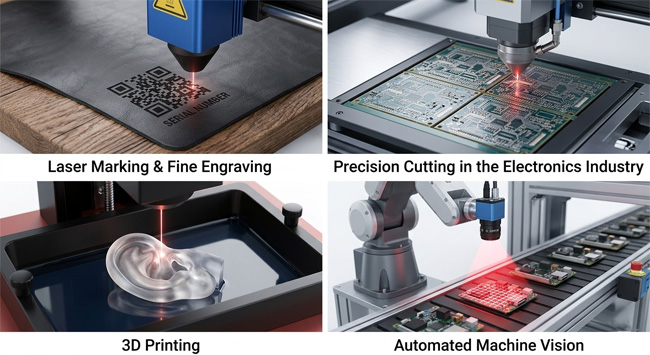
Leveraging the advantages of non-contact processing and high precision, laser modules have become deeply integrated into modern manufacturing, effectively solving long-standing pain points that traditional methods fail to address:
- Laser Marking & Fine Engraving: Utilizing the high absorption characteristics of high-power blue laser modules, this setup enables high-speed, deep engraving on wood, leather, and plastics. It allows for the permanent marking of QR codes and serial numbers with perfectly clean, carbonization-free edges.
- Precision Cutting in the Electronics Industry: In precision manufacturing processes such as PCB depaneling, laser modules offer flexible, tool-wear-free processing. This significantly enhances the production yield rates of delicate electronic components.
- 3D Printing (Additive Manufacturing): Industrial light-curing printers require specific light wavelengths to solidify liquid resin. Using a dedicated blue laser module for 3d printer ensures the light cures each layer precisely, turning computer models into sharp, detailed parts fast.
- Automated Machine Vision: On high-speed automated assembly lines, highly stable visible-light laser modules provide precise coordinate references and contour recognition assistance for robotic arms and CCD cameras.
Conclusion
Choosing the right laser module is the most important first step to make your machine run properly. Whether your application requires a few milliwatts of high-precision red laser for alignment, tens of watts of industrial-grade blue light for heavy-duty cutting, or a specialized fiber-coupled configuration, ATO Automation is here to streamline your selection process. Partner with us to eliminate the guesswork and discover the factory-grade solutions perfectly tailored to your exact technical demands.
FAQs
Still trying to figure out your specific configuration? Let's break down a few more common setup questions below.
Q: What is the difference between TTL and PWM control?
A: TTL is like a fast light switch. It only turns the laser fully ON or fully OFF, making it ideal for quick triggering, dotting, or scanning. PWM works like a dimmer switch. It changes the power smoothly from 0% to 100%, which you need to control cutting depth or do shaded photo engraving.
Q: Will heat damage my laser module and shorten its life?
A: Yes. Overheating makes the laser diode lose power, shift color, and burn out early. To keep your laser alive, always use an aluminum heatsink or a cooling fan. Keep the machine running inside its safe temperature limits, usually between 0°C and 70°C.
Q: How do I choose between free-space and fiber-coupled lasers?
A: Choose a free-space laser module if you want something simple, light, and cheap for a standard engraving head that shoots straight down. Choose a fiber-coupled laser module if you are building a moving robotic arm or have a tight machine frame where the light must bend through a flexible cable.
Q: Can a 40W blue laser module cut through sheet metal?
A: No. These 10W to 40W blue lasers are made for wood, leather, and plastic. They cannot cut metal sheets. While metals absorb blue light, cutting a steel plate requires massive factory machines with thousands of watts of power. However, you can use a 40W blue module to etch high-contrast labels and barcodes onto stainless steel.
