
Industrial Hour Meter Buying Guide & Troubleshooting
Introduction
This guide helps small business owners and field electricians fix hour meters on control panels, generators, air compressors, and pumps. Common issues: no display, water damage, signal jumps, and high vibration errors.
You will get a field-level troubleshooting and selection guide. It helps you get your system running again -- and buy the right one next time.
Procurement teams can use the quick selection module to order quickly. Want to know why these failures happen? Chapter 2 covers AC/DC mix-up, inductive spikes, IP68 differences, crystal vibration errors. It helps both owners understand selection logic and engineers get technical details.
If your equipment is down and you need a quick fix -- go straight to Chapter 1. If you want to learn how to select correctly and never buy wrong again -- start with Chapter 2. The table of contents is below. The procurement module is right after this introduction.
Table of contents
Procurement quick module
Choose your hour meter in 5 steps
Follow the 5‑step decision table below. Each step leads you to the right series for your equipment.
| Step No. | Equipment Condition & Requirement | Yes (Recommended Action) | No (Next Step) |
| 1 | Does the device have external power? | Go to step 2 | Choose lithium battery powered -- done |
| 2 | Indoor or outdoor? (Indoor = Yes) | Choose standard type, go to step 3 | Choose waterproof (IP67/IP68), go to step 3 |
| 3 | Do you want to prevent resetting? (Prevent = Yes) | Choose non-resettable, go to step 4 | Choose resettable, go to step 4 |
| 4 | Is the voltage clear and single? (Clear = Yes) | Pick by actual voltage (AC 220V or DC 12V/24V), go to step 5 | Choose AC/DC wide voltage, go to step 5 |
| 5 | Do you know the cutout size? (Know = Yes) | Match with "cutout size" on product page | Choose a removable panel type or a surface-mounted / bracket-mounted type (lithium model) |
Hour meter quick reference table for procurement
If you already have a failure (no display, water ingress, high error), skip the 5 steps and use the quick troubleshooting table below.
| Equipment Problem & Operation Need | Recommended Series | Reference Price |
| Customer reports no display, no counting (power confirmed) | Digital basic | $59.11 |
| Outdoor equipment -- water ingress, moisture | Waterproof series (IP67/IP68) | $72.65 |
| High vibration equipment (generators, diesel engines) -- large errors | Digital series | $59.11 |
| Resets to zero after power loss -- data lost | EEPROM series (permanent storage) | $72.65 |
| Rental equipment -- prevent tampering | Non-resettable series | $72.65 |
| No external power (mobile industrial equipment) | Lithium battery-powered | $46.33 |
| Customer not sure -- need a universal model | Main industrial digital series | $59.11 |
Prices are for reference only. Subject to real-time changes on the product page.
How to use:
Resettable -- good for maintenance cycles (reset after each service)
Non-resettable -- good for rentals (total hours only go up)
Find your biggest headache in the left column. The right column shows the series you need. For failure principles or technical specs, read chapter 2 and the full table at the end.
Chapter 1 -- Hour meter failed? Get it working fast
Most failures start with the wrong choice. For why, read chapter 2.
Goal of this chapter: When your hour meter fails, you can find the problem in 5 minutes, take a temporary fix to resume production, and decide if you need to replace it now.
We cover four common failure scenarios. Each follows: Quick diagnosis → Temporary fix → When to give up.
1.1 The hour meter does not display or is not counting
Core takeaway: Check power first. Then check the wiring. Then consider internal damage.
| Step | Action | Note |
| Quick diagnosis | Measure terminal voltage with a multimeter. No multimeter? Check for loose wires or a dead battery. | Confirm the voltage type (AC/DC) and value matches the label. |
| Quick diagnosis | Check terminals for looseness or corrosion. | Common contact problem. |
| Temporary fix | Re-plug and tighten terminals. For internal lithium battery models (ATO-EHM-H7ET), the battery lasts approx. 5 years; if expired, the entire unit needs to be replaced to maintain its sealed enclosure. | A lithium battery lasts about 5 years. Replace when dead. |
| When to give up | Voltage is correct, but no response. Burn marks or a burnt smell on the case. | The internal power board is fried. Must replace. |
Note: On generators, compressors, or other frequently moved equipment -- suspect loose wires from vibration.
1.2 Hour meter numbers jump or reset (power loss / EMI)
Core takeaway: Usually caused by data loss after power loss, or electromagnetic interference (EMI). Test: Power off, wait 10 seconds, power on. Does it return to the previous number?
| Step | Action | Note |
| Quick diagnosis | Cut power, wait 10 seconds, then power on again. | See if it resets to zero or random numbers. |
| Quick diagnosis | Check for large motors, VFDs, or welders nearby. | Strong EMI can corrupt digital circuits. |
| Temporary fix | Move the hour meter away from the interference source (at least 20 inches). Add a ferrite core on the power line (you can take one from old equipment). | Ferrite core reduces high-frequency noise. |
| Temporary fix | If it resets every time power is lost, the meter has no EEPROM, or the battery is dead. Record the current hours, then use a small UPS as a temporary power source. | |
| When to give up | Still jumps after moving away and rewiring. Or it resets and never recovers any data. | Chip is damaged. Replace it. |
1.3 Hour meter water ingress or foggy display (IP rating issue)
Core takeaway: Wrong ingress protection rating is the root cause. Temporary fix: cut power and dry thoroughly. But you must replace it with a waterproof model.
| Step | Action | Note |
| Quick diagnosis | Remove the bezel. Look for water stains, green corrosion, or white crystals inside. | Clear sign of water ingress. |
| Temporary fix | Cut power immediately. Open the case (if possible). Use a hair dryer on the cold setting to dry inside for at least 10 minutes. | Hot air can damage plastic parts and the LCD. |
| Temporary fix | Use silicone sealant to temporarily seal case seams and cable entry. | Emergency only -- not long-term waterproof. |
| When to give up | Still shows a garbled display after drying. Buttons don't respond. The circuit board has visible corrosion. | The main board is permanently damaged. Must replace. |
Important reminder: If your equipment lives outdoors, in wet areas, or near salt spray, a standard IP54 hour meter will fail. Jump to chapter 2 and pick an IP67 or IP68 model.
1.4 Hour meter reading too fast or too slow (vibration error)
Core takeaway: Mechanical hour meters accumulate errors under high vibration. Digital meters rarely have this problem -- if they do, the crystal oscillator is likely damaged.
| Step | Action | Note |
| Quick diagnosis | Compare with a stopwatch over 1 actual run hour. | Example: equipment runs 1 hour, meter shows 1 hour 12 minutes. |
| Temporary fix | Note the error percentage. Manually convert hours in your maintenance log. | Example: meter reading × 0.83 = actual hours. |
| When to give up | Error >5% and growing. Or you hear an unusual noise inside (mechanical type). | Mechanical contacts are worn, or the crystal is old. Must replace. |
| Next step | If your equipment is a diesel generator, heavy machinery, construction machinery, or other high-vibration equipment -- switch to a digital hour meter. | Digital is far more vibration-resistant than mechanical. |
1.5 Summary -- After fixing your hour meter, what's next?
Based on your current situation, follow the recommended action below.
| Your current situation | Recommended next step |
| The temporary fix worked, and the machine is running normally. | Spend 15 minutes reading Chapter 2. Learn why this failed and how to choose correctly next time. |
| The hour meter is completely dead -- must replace now. | Jump to the full comparison table at the end of chapter 2. Pick the recommended ATO model for your equipment. |
| The machine runs, but the hour meter is not fixed yet. | Track run hours manually (write down hours each day). Then contact ATO support for selection advice. |
Chapter 2 -- Why your hour meter keeps failing – real cases & engineering principles
This chapter helps both owners understand why they keep picking the wrong model and gives engineers the technical details they need. Each section starts with a real case, then explains the core principle, limits, and common mistakes. The full comparison table at the end serves as a technical summary.
2.1 Hour meter voltage mismatch: why AC/DC mix-up destroys your meter
Case: A factory installed AC 220V hour meters on a DC 24V control panel. All meters smoked immediately on power-up. The electrician later said, "I thought since both were under 24V, AC and DC wouldn't make a difference."
Core takeaway: AC and DC hour meters use completely different internal power supplies. Mixing them destroys the meter instantly.
Limits: Wide-voltage models (AC/DC 12-240V) need at least AC 85V or DC 10V to start. Below that, they may not work.
Common mistakes: Seeing "12-24V" and assuming it means wide voltage -- it may be DC only. Using motor voltage (e.g., 380V) as if it were instrument voltage.
| Your voltage situation | Recommended solution |
| Fixed, single voltage (AC 220V) | Dedicated AC 220V hour meter |
| Multiple voltages mixed, or mobile equipment | Wide-voltage model (AC/DC 12-240V) |
| DC 12V or 24V | DC-dedicated model or wide-voltage |
2.2 Hour meter IP rating: why IP54 fails in heavy rain
Case: A contractor installed IP54 hour meters on outdoor rollers. After the rainy season, 7 out of 9 meters failed with water inside. The site lead said, "The meters are inside the panel -- not submerged. How could water get in?"
Core takeaway: IP54 only stops splashes. Outdoor with no overhead cover needs IP67 or higher. IP67 survives brief submersion (1 meter for 30 minutes). IP68 survives continuous submersion (conditions set by the manufacturer).
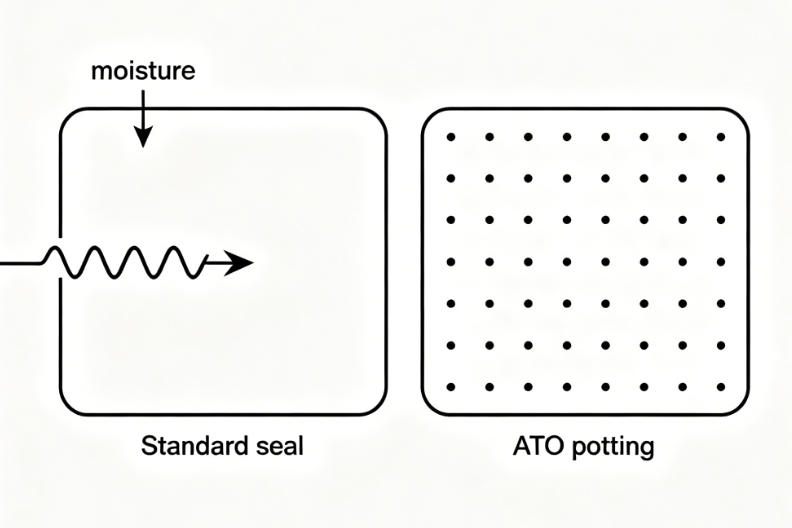
The hidden problem -- breathing effect: On a generator that runs in the hot sun, the internal temperature hits 70°C. Air inside expands. At night, the temperature drops sharply, creating negative pressure that pulls humid air and salt spray into the case. In outdoor environments with temperature fluctuations, conventional sealed enclosures can suffer from the "breathing effect", drawing moisture inward and causing internal condensation. The ATO IP68 series uses a fully sealed structural design with a specialized potting process to eliminate residual internal air, fundamentally preventing moisture ingress caused by thermal cycling.
Limits: Seals' age (check every 2-3 years). Poor cable entry breaks the protection. UV makes plastic cases brittle.
Common mistakes: Believing IP54 stops rain (it doesn't -- heavy rain seeps in). Thinking "case feels solid" means IP68 (needs third-party test).
| Environment | Minimum IP rating |
| Indoor, dry | IP40 (no special need) |
| Indoor, dusty | IP65 |
| Outdoor with a roof cover | IP65 |
| Outdoor, no cover | IP67 |
| High-pressure wash or submersion | IP68 |
2.3 Hour meter vibration error: mechanical vs digital – which one survives?
Case: A plant installed a mechanical hour meter on a backup diesel generator. After six months, the meter error reached 20%. The oil carbonized, piston rings seized, and the repair cost $4,200. The owner said, "I thought the generator was just poor quality."
Core takeaway: Mechanical meters hate vibration (contacts bounce, gears skip). Digital meters handle vibration well (crystal oscillator + MCU). Mechanical error: ±0.5% to ±1%. Digital error: ±0.01%.
Limits: Digital wide-temperature models go from -30°C to 85°C. Standard digital models top out at 70°C. Strong EMI (like welders) may reset digital meters.
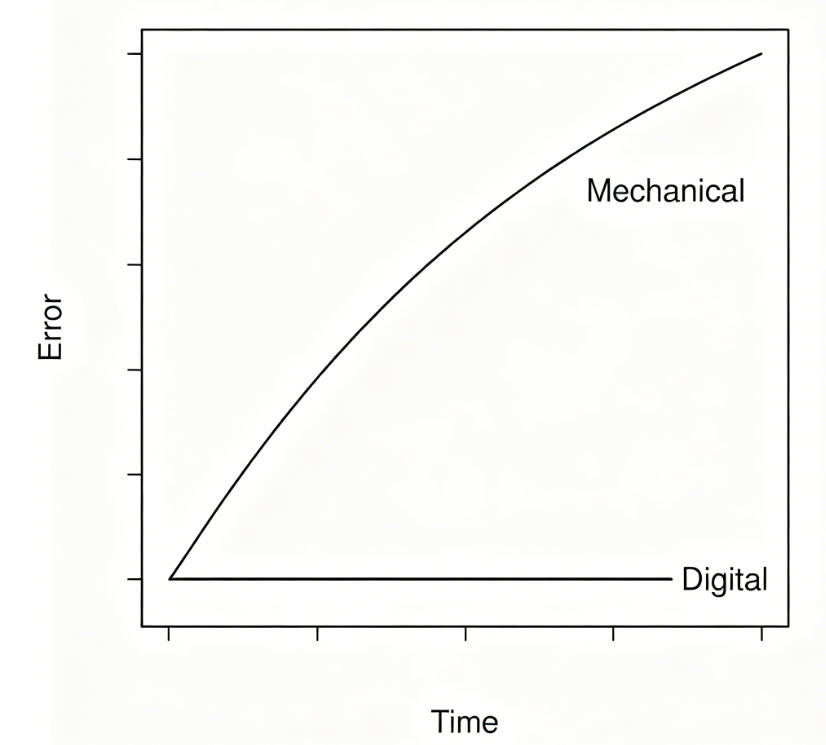
Common mistakes: Believing "mechanical is more reliable" -- not true under vibration. Thinking LCD damage at -20°C (it slows down but doesn't break).
| Equipment vibration level | Recommended type | Avoid |
| Low (fixed air compressor) | Mechanical or digital | --- |
| Medium (light portable power pack) | Digital preferred | Mechanical or electromagnetic |
| High (diesel generator, heavy machinery) | Digital | Any mechanical |
2.4 Hour meter data loss after power outage: EEPROM vs lithium battery
Core takeaway: EEPROM saves data permanently (no loss for 100 years even without power). Lithium battery models save data for about 5 years -- equal to battery life.
Limits: Lithium batteries lose capacity in cold and age faster in heat. Resettable models usually have a maximum reset count (e.g., 100,000 times).
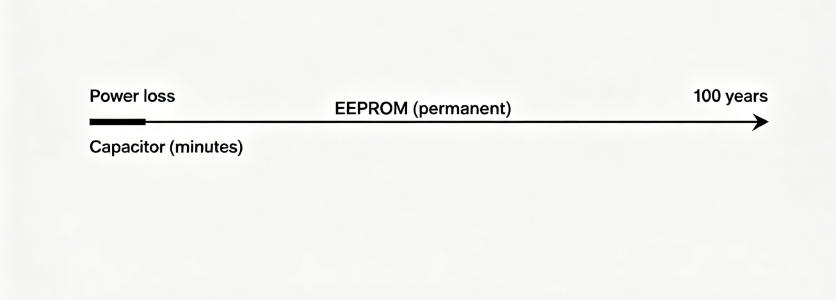
Common mistakes: Using capacitor-backed models (hold data for minutes only) on critical equipment. Choosing resettable for rental equipment -- renters can cheat.
| Your need | Recommended storage |
| Simple total hours | EEPROM, non-resettable |
| Reset after each maintenance | EEPROM, resettable |
| No external power | Lithium battery-powered |
| Rental -- prevent tampering | EEPROM, non-resettable |
Full comparison table -- One table solves your problem
How to use this table: Find your problem or need in the left column. Check the principle link (jumps to the section above). Follow the correct action. Pick the recommended product series.
| Equipment Problem / Specific Need | Engineering Principle | Correct Technical Action | Recommended Series |
| AC/DC mismatch burnout | 2.1 Voltage type | Confirm voltage type, or switch to wide-voltage | Wide-voltage series |
| Outdoor, no cover – water ingress | 2.2 Ingress protection | Choose IP67 or higher | Waterproof series (IP68) |
| Wet environment (industrial cleaning, outdoor panels, high humidity) | 2.2 Ingress protection | Choose IP68, seal cable entry | Waterproof series (IP68) |
| High vibration (diesel generator) – large errors | 2.3 Mechanical vs. digital | Choose digital | Digital series |
| Farm/mobile heavy equipment – mechanical meters failing | 2.3 Mechanical vs. digital | Choose digital, add a vibration-absorbing bracket | Digital series |
| Resets to zero or jumps after power loss | 2.4 Data storage | Choose EEPROM or lithium battery | EEPROM series or Lithium series |
| Rental equipment – prevent resetting | 2.4 Resettability | Choose non-resettable | Non-resettable series |
| Reset after each maintenance | 2.4 Resettability | Choose resettable | Resettable series |
| No external power available | 2.4 Power source | Choose a lithium battery-powered | Lithium series |
| Digital jumps when the welder runs | EMI | Move away, add a ferrite core, or use a shielded model | Wide-voltage digital |
| Need RPM monitoring + hour total | Feature expansion | Choose an hour meter with speed measurement | RPM + hour series |
| High-temp engine bay (>70°C) – LCD black | Operating temperature | Choose a wide-temperature model (-30 to 85°C) | Wide-temp series |
| Cutout size mismatch – won't fit | Mounting size | Measure cutout, or choose removable panel type | Universal panel series |
Why does ATO keep prices low?
ATO is not a factory. We are an integrator that works directly with manufacturing sources. We cut out all brand layers -- distributor networks, regional agents, brand markups. We source directly from factories and stock in bulk. The savings go directly to you. ATO prices are significantly lower than major industrial brands. For similar specifications, you can expect to save between 30% to 50% compared with big-brand prices. Bulk orders get better discounts. Contact us for a quote. Not sure which to choose?
Tell us your equipment type, environment, and voltage requirements. We will lock the right model for you. Request a quote or sample now. For more about ATO, please visit our official website.
