
Load Cell FAQs
Whether monitoring weight on a production line or ensuring accurate shipments from a warehouse, load cells play a crucial role. But are you troubled by questions during installation, commissioning, or daily use? Don't worry! We've compiled these load cell FAQs to quickly answer your questions and make weighing measurements simple and reliable.
Frequently Asked Questions about Load Cell
- Q1: What is a load cell? Load cell vs. Weight vs. Force sensor?
- Q2: What are the common types of load cell sensors?
- Q3: What is the sensitivity of the load cell?
- Q4: 1mv/v micro parallel beam load cell increases to 2mv/v?
- Q5: How to choose the right load cell
- Q6: Analog vs. Digital? How to choose?
- Q7: What kind of instrument should I use with a load cell?
- Q8: Why should the load cell be used with the transmitter?
- Q9: When should a junction box be used with a load cell?
- Q10: How do I connect a load cell to a computer/PLC?
- Q11: Precautions when installing a load cell?
- Q12: Is my load cell broken?
- Q13: Do load cells need regular calibration? How often?
Q1: What is a load cell? Load cell vs. Weight vs. Force sensor?
Answer: The Load cell is the part that actually does the weighing in digital scales. It's a metal block or bar with special sensors stuck to it. When you put weight on it, it bends just a tiny bit, and that bending gets converted into an electrical signal that tells the scale how heavy something is.
People use these terms pretty interchangeably, but there's a small technical difference.
- A load cell is the most common type of force sensor, specifically designed for measuring weight (which is a force caused by gravity).
- A weight sensor is basically just another name for a load cell.
- A force sensor is the general term for anything that measures a push or a pull.
So, "Weight sensor" and "load cell" usually mean the same thing. All load cells are force sensors, but not all force sensors are load cells.
Q2: What are the common types of load cell sensors?
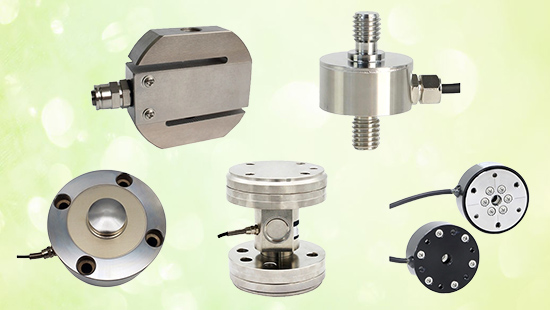
Answer: Common types of load cell sensors are mainly classified according to their mechanical structure and force-bearing mode.
- S-type: Good for both pulling and pushing. Used in hanging scales or testing machines.
- Shear Beam: Really common. Used in platform scales or tank weighing. Handles side forces well.
- Bending Beam: Cheap and simple. Good for low-capacity scales.
- Single Point: Special type for small platform scales. You can put weight anywhere on the platform.
- Column: Like a large column or can, it has a strong structure, can withstand very large pressure (tens to hundreds of tons).
- Pancake or Low-Profile: Short and flat, like a big metal pancake. It's great when you don't have much space to install it.
- Compression: Big and tough. Used for heavy stuff like truck scales or silos.
- Tension: Just for measuring a pull, like how much weight is hanging from a crane hook.
Q3: What is the sensitivity of the load cell?
Answer: Sensitivity tells you how much electrical signal you get out of the load cell when you put weight on it.
It's usually expressed as "2 mV/V." In layman's terms, for every 1 volt applied to the load cell, at maximum load, it will give you back a 2 millivolt signal.
So, higher sensitivity = a stronger, easier-to-measure signal.
It's like the sensor's "volume" setting for its response to weight.
Q4: 1mv/v micro parallel beam load cell increases to 2mv/v?
Answer: In theory, you could make a micro parallel beam load cell more sensitive. But if the space for the flexure is super tight, you've got a problem. To get higher sensitivity, you'd have to make the beam thinner. But a thinner beam is just too flimsy—it wouldn't be stiff enough. So, you're basically stuck; you just can't increase the sensitivity.
Q5: How to choose the right load cell
Answer: Picking the right load cell boils down to answering a few key questions:
- "How heavy?": Figure out your maximum weight. Then, add a safety margin and pick a capacity a bit higher than that.
- "How accurate?": How precise do your measurements need to be? This determines the accuracy class you need (and your budget).
- "How will it fit?": Look at the space you have and how the sensor will be mounted. This picks the type (like an S-type, pancake, or beam).
- "Where will it live?": What's the environment like? Does it need to be waterproof? Dustproof? Handle chemicals? This decides the material and protection (like its IP rating).
- "Analog or Digital?": For simple jobs, analog is fine. For long cables, noisy areas, or connecting multiple sensors to one system, digital is way easier.
- "What's the price?": Usually, higher capacity, better accuracy, and tougher build mean a higher price. For more details, please refer to the ATO's blog on the load cell price list.
Q6: Analog vs. Digital? How to choose?
Answer: Most new projects are using digital technology. Digital technology is easier to use and more reliable.
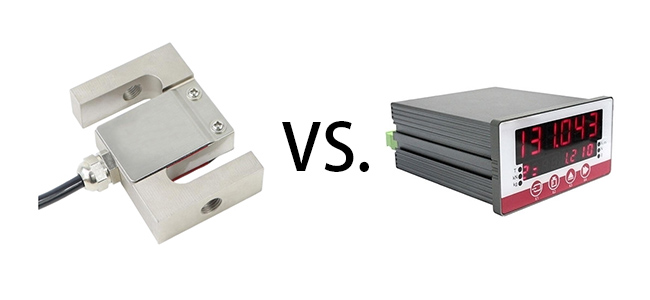
Analog load cells: They emit a very weak signal (like a whisper). This signal is easily affected by electrical noise, especially over long cables. You need a special receiver (analog indicator) that is properly adjusted to receive the signal.
Digital load cells: They have a microcomputer inside. They receive the weak signal, instantly convert it to a digital signal (like sending a text message), and then transmit it. Digital signals are strong and less susceptible to noise interference.
Choose a digital load cell if:
- You are running long cables.
- Your factory has a lot of electrical noise (from large motors or welding machines).
- You use multiple load cells on a single scale (such as a large platform). Using a digital load cell makes this very simple.
- You want easier setup and troubleshooting (usually through software).
An analog load cell may be right for you if:
- It's a simple, short-distance job.
- You have a limited budget and already have analog equipment.
- It can replace older analog systems.
Q7: What kind of instrument should I use with a load cell?
Answer: A load cell must be used with an instrument that provides power and processes the signal. Depending on the requirements, these instruments can be categorized into several types:
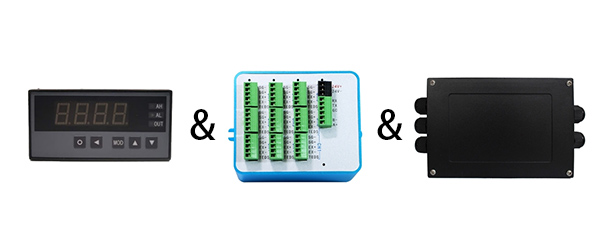
- Display controller: A hardware component that manages and outputs visual data to a display screen.
- Load cell transmitters: These convert the signal into a standard industrial signal such as 4-20mA or RS485 for remote transmission to a PLC or computer.
- Load cell junction boxes: These are used in multi-sensor systems, such as multi-scale systems, to balance the signals from each sensor.
The key to selecting an instrument is to match the sensor's signal type (analog mV/V or digital) with the required functionality.
Q8: Why should the load cell be used with the transmitter?
Answer: Because resistive strain gauge load cells utilize elastic elements that deform under load, the internal components also deform, thus preventing change. Under the same input voltage, the output signal is a microvolt (mV) signal. These very small signals are susceptible to interference from transmission leads (resistance) and strong voltage and current (electromagnetic interference). They cannot be transmitted over long distances and are not standardized, making them difficult to detect by most secondary instruments, PLCs, and DCS systems.
On the other hand, a transmitter converts the sensor signal into a standard 4-20mA signal with strong anti-interference capabilities, making it suitable for transmission within 0-100m and easier to receive and detect. Therefore, we recommend that you purchase a load cell with a transmitter.
Q9: When should a junction box be used with a load cell?
Answer: Junction boxes are designed for analog load cells. Since sensor consistency may not be ideal at the factory, coupled with environmental factors and installation limitations in the field, multiple sensors connected in parallel can cause imbalance.
To address these issues, a load cell junction box is necessary to adjust the ratio of the sensor coefficient to the sensor's output impedance (mV/V/Q) to a near-consistent value, ensuring the balance of the entire scale.
The junction box's main function is to aggregate signals and adjust for angular deviations. Without a junction box, signals can be received normally, but in a multi-sensor system, the output of each sensor may vary. This can be achieved by adjusting the adjustable resistors within the junction box to achieve balance.
Q10: How do I connect a load cell to a computer/PLC?
Answer: There are two main ways to connect a load cell to a PLC, a computer component:
Digital load cell connection
Digital sensors directly output digital signals (such as RS485) and can be connected using the following methods:
- Connecting to a computer via an RS485 to USB/Ethernet converter
- Directly reading data via the PLC's communication module (such as Profibus/Modbus). This method offers strong interference resistance and is suitable for multi-sensor networking and long-distance transmission.
Analog load cell connection
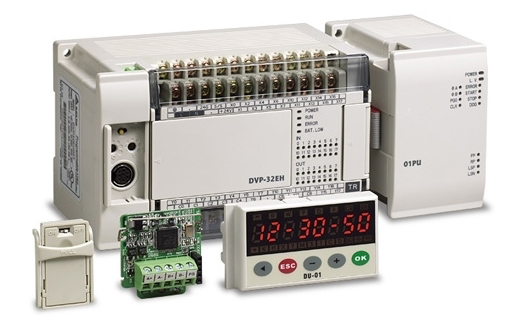
Analog sensors require a weight transmitter. The transmitter converts the sensor's mV/V signal into a standard industrial signal (such as 4-20mA or 0-10V), which is then received and processed by the PLC's analog input module. This is the most traditional connection method.
Regardless of which method is used, a complete weighing control system integration ultimately requires: PLC programming software for signal configuration and logic control, and computer-based weighing software for data visualization, storage, and analysis. Digital sensors are recommended for their simplified wiring, improved interference resistance, and suitability for industrial environments.
Q11: Precautions when installing a load cell?
Answer: There are three key points to note when installing a load cell:
- Alignment: Ensure the load-bearing axis is vertical to avoid lateral forces. Use spherical washers for alignment. For multi-sensor systems, the foundation must be level.
- Wiring protection: Ensure cables are properly connected and securely fastened. For long-distance transmission, a six-wire system or digital signal is recommended.
- Environmental protection: Select the IP rating based on the environment, install an overload protection device, and check the zero point and recalibrate after installation.
Proper installation is essential for ensuring the accuracy and lifespan of the weighing system. It is recommended that this be performed by a professional according to specifications.
Q12: Is my load cell broken?
Answer: Wondering if your load cell is bad? Here's a quick way to check:
- Do a visual inspection: Inspect it carefully. Does it bend, crack, or appear severely damaged? If so, it's probably dead.
- Use a multimeter: Unplug the cable and check the resistance between the wires. The resistance should be close to the value listed on the spec sheet (usually, all wires should be close). If the reading is unusual or there's no reading at all, that's a bad sign.
- Check the output: Plug in the power cord and apply power (but don't apply any weight) to see what the signal is. If the reading jumps around or stays stuck at zero, there's a problem.
If any of these tests fail, it's likely bad. But remember, sometimes it's just a damaged cable or loose connection, so check those too.
Q13: Do load cells need regular calibration? How often?
Answer: Yes. Calibration intervals depend on the usage environment, frequency, accuracy requirements, and industry regulations (e.g., scales used for trade settlements are subject to mandatory verification). Annual calibration is generally recommended, but applications requiring high precision or in harsh environments may require a shorter interval.
I hope this blog helps you solve any problems you may have or raise. If you have any further questions, please contact the ATO Industrial Automation.
