
How to Configure a PLC Servo Control System to Keep S-ON OFF?
In a PLC-based servo position control system, the servo-on (S-ON) signal enables the servo drive for operation. How can the S-ON signal be kept OFF even when the physical enable button is pressed? This article explains the wiring, servo drive parameter settings, and PLC ladder logic used to configure a system with S-ON permanently inactive, followed by an operation test.
- System Components
- Wiring Connections
- Servo Drive Parameter Settings
- PLC Ladder Logic and System Testing
- Conclusion
I. System Components
The system uses a PLC-based pulse control method, with the PLC sending pulse signals to the servo drive to control motor movement. The main components include:
- PLC (Omron CP1E N40DT-D): Controls the motion sequence and processes input and output signals.
- Servo Drive: Receives pulse signals from the PLC to control motor operation.
- Servo Motor: Executes movement commands for position control.
- Three-Button Control Station: Provides clockwise (CW), counterclockwise (CCW), and stop commands.
- S-ON Enable Button: Provides the servo enable signal.
- Emergency Stop Button: Connects to a PLC input for software stop control.
- Interposing Relays (x3): Two relays handle motion limits, while the third is used for alarm reset.
All these components are available from ATO. Visit our online store to find what you need for your servo control system.
II. Wiring Connections
The wiring diagram below shows the connections between the PLC, servo drive, servo motor, control buttons, and interposing relays.
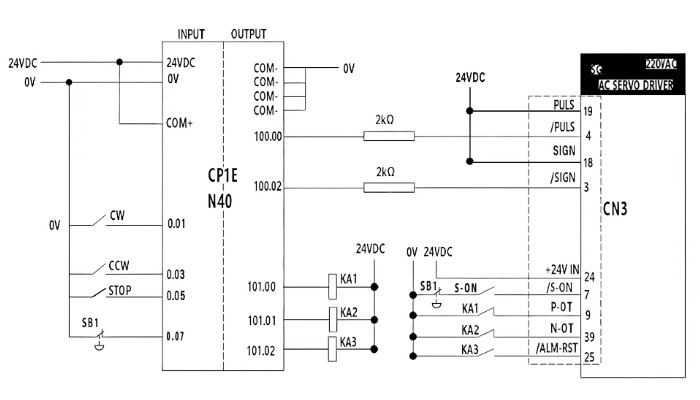
Key connections are outlined below:
- Control Station to PLC: The CW, CCW, and STOP buttons connect to the corresponding PLC inputs for motion control.
- Emergency Stop and S-ON Circuit: The E-Stop connects to a PLC input (e.g., 0.07) for software stop control. It is also wired in series with the S-ON enable button inside a junction box, with the circuit connected to pin 7 of the servo drive's CN3 connector.
- PLC to Servo Drive: The PLC outputs pulse signals to the servo drive to control motor movement.
- Servo Drive Connections: The main power supply connects to L1 and L2, the control power supply to L1C and L2C, and the servo motor to U, V, W, and ground. The encoder connects through CN4.
III. Servo Drive Parameter Settings
To keep the S-ON signal permanently OFF, configure the servo drive parameters as follows.
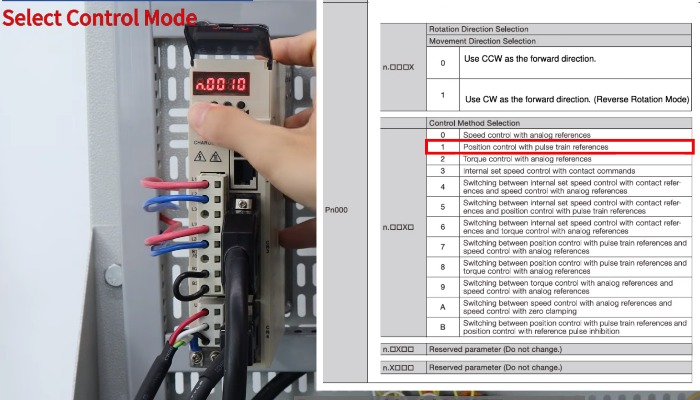
Step 1: Set Position Control Mode
- Set control mode to position control.
- Press the M/SET button on the servo drive. Navigate to parameter Pn000 and press DATA.
- Set the parameter value to n.0010 for position control using pulse train references.
- Press and hold M/SET to save the setting.
Step 2: Configure Input Signal Allocation
- Navigate to parameter Pn50A.
- Press DATA and set the value to n.2101 to enable configurable input signal allocation.
- Change the value to n.2181 to configure the S-ON signal as always inactive.
- Press M/SET to confirm the setting.
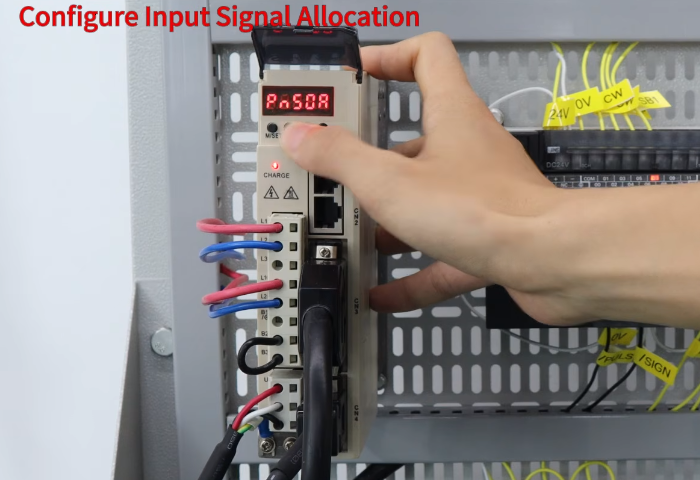
Note: These settings are for this demonstration. Refer to your servo drive manual for model-specific settings.
IV. PLC Ladder Logic and System Testing
After configuring the drive, create a PLC project using the appropriate device and CPU type, then implement the motion control logic.
In the demonstrated program, the emergency stop is represented by a normally closed contact, so the PLC input is ON during normal operation. The main control functions are as follows:
- Pressing CW sends a 20 kHz pulse train for clockwise rotation.
- Pressing CCW sends pulses for reverse rotation.
- Pressing STOP stops the PLC pulse output, bringing the motor to a controlled stop.
- When the emergency stop is triggered, the system stops motion.
- Relays KA1 and KA2 prevent further movement when the corresponding limits are reached. Relay KA3 provides the alarm reset function when triggered.
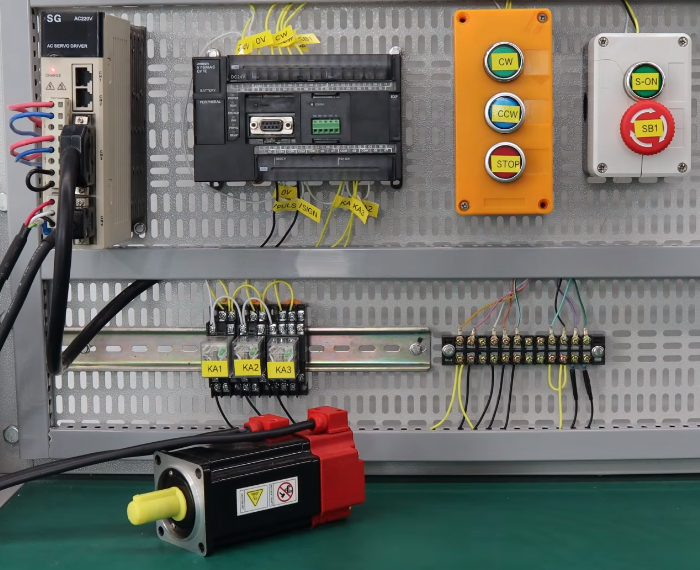
After programming the PLC, power on the system and press the physical S-ON button to test the configuration. The servo drive remains out of RUN state, and the motor does not operate, confirming that S-ON is kept OFF by the parameter setting. To restore normal servo operation, change the relevant drive parameter.
V. Conclusion
This article explains how to configure a PLC-based servo control system to keep the S-ON signal permanently OFF through drive parameter settings, wiring, and PLC ladder logic. This configuration can help prevent servo operation during testing, maintenance, or troubleshooting, even when motion commands are sent or the physical S-ON button is pressed. For a step-by-step demonstration, watch the video linked below. If you're looking for components for your own servo control system, visit ATO to explore our product range. When applying the configuration described in this article, remember that keeping S-ON OFF does not replace proper safety measures. Always refer to the servo drive manual and follow applicable safety procedures.
