
How to Tune Acceleration and Deceleration in PLC Servo Position Control?
Acceleration and deceleration tuning helps make motor startup and stopping smoother in PLC servo position control systems. Adjusting the servo drive's smoothing parameter can reduce sudden mechanical shock and vibration. This guide explains the wiring, servo drive parameter settings, and motion tests before and after smoothing.
- Required Components
- System Architecture and Wiring
- Configure the Servo Drive Parameters
- PLC Program Logic
- Motion Smoothing Test: Before and After
- Conclusion
I. Required Components
- PLC
- Servo drive
- Servo motor
- Three-button control station (clockwise, counterclockwise, and stop)
- S-ON enable button
- Emergency stop button (SB1)
- Three interposing relays (KA1, KA2, and KA3)
II. System Architecture and Wiring
The system uses pulse-based positioning. The PLC sends pulse signals to the servo drive, which controls the motor according to the received commands. The experiment focuses on improving motion smoothness by adjusting the drive's position-reference smoothing parameter.
1. Physical Wiring
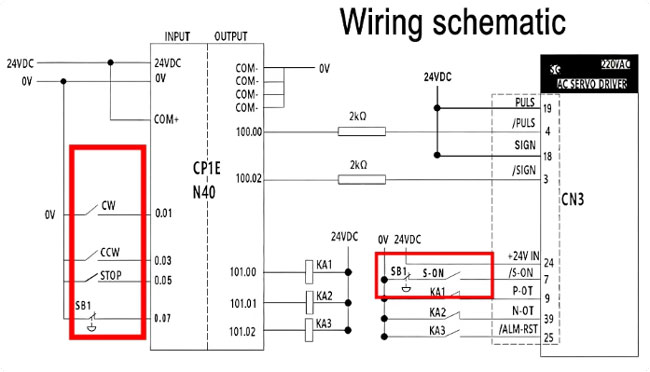
Each button on the pendant station connects to a designated PLC input. The clockwise, counterclockwise, and stop buttons connect to PLC input points 0.01, 0.03, and 0.05, respectively.
The emergency stop button SB1 connects to the PLC input circuit and is also wired in series with the S-ON enable button inside the same junction box. The S-ON enable signal connects to terminal 7 of the servo drive's CN3 connector.
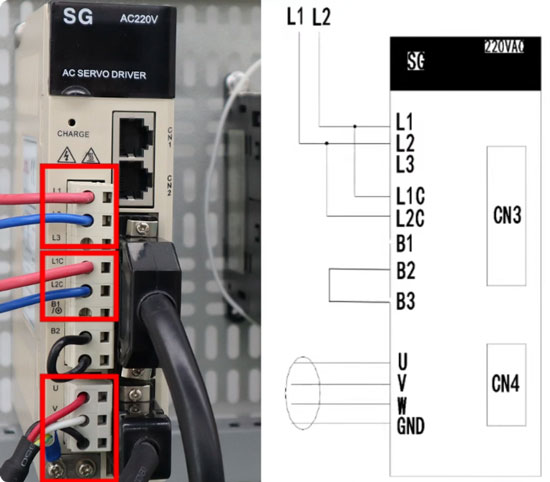
The PLC sends pulse output signals through the assigned output terminals to control motor movement. The servo drive's main power supply connects to terminals L1 and L2, while control power connects to L1C and L2C. The servo motor connects through the U, V, W, and ground terminals, and encoder feedback passes through the CN4 connector.
2. Electrical Schematic and Relay Connections
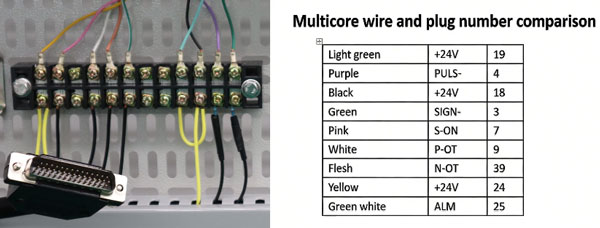
The CN3 wiring table identifies signal connections by wire color and terminal or pin number. Follow the applicable wiring diagram when preparing the CN3 cable. The schematic also shows three interposing relays:
- KA1: Clockwise limit protection.
- KA2: Counterclockwise limit protection.
- KA3: Alarm reset.
III. Configure the Servo Drive Parameters
Step 1: Select Position Control Mode
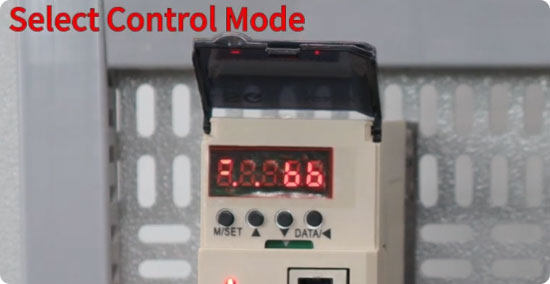
- Press M/SET to enter the parameter menu and locate Pn000.
- Press DATA to edit the value.
- Change the setting to n.0010.
- Press and hold M/SET to save the setting.
Step 2: Adjust the Smoothing Parameter
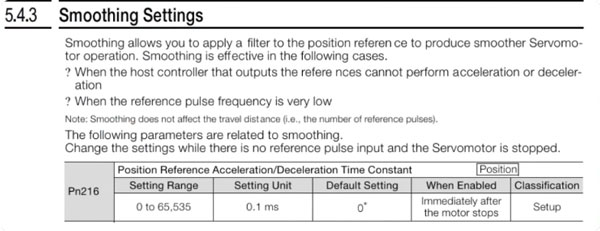
Next, locate parameter Pn216, which sets the position-reference acceleration and deceleration time constant. This parameter smooths changes in the position command, allowing the drive to control acceleration and deceleration more gradually. When Pn216 is set to 0, the smoothing function is disabled. For this demonstration, Pn216 is set to 6400.
The Pn216 setting range is 0 to 65,535, with a unit of 0.1 ms. A setting of 0 disables the smoothing filter. In this demonstration, the parameter is set to 6400, corresponding to a time constant of 640 ms.
In practical applications, start with a lower value and increase it gradually according to the machine's motion requirements. Higher values generally produce gentler command transitions, but the appropriate setting depends on the drive, motor, and mechanical system.
Stop the motor and ensure no reference pulse input is present before changing Pn216. The new setting does not take effect while the motor is running; it becomes active during a subsequent motion cycle after the motor stops.
IV. PLC Program Logic
The control program is developed using a CP1E PLC with an N40 CPU.
- Clockwise (CW): Outputs a 100 kHz pulse signal for clockwise rotation.
- Counterclockwise (CCW): Outputs a pulse signal at the same frequency for reverse rotation.
- Stop: Stops pulse output and stops the motor.
- Emergency stop (SB1): Uses a normally closed contact. The PLC logic interrupts normal forward and reverse motion commands when the emergency stop input is activated.
The emergency stop response described here reflects the demonstrated control logic. A PLC input and S-ON circuit alone do not establish that the system meets the requirements for a safety-rated emergency stop function.
The three interposing relays support limit protection and alarm handling. KA1 provides clockwise limit protection, KA2 provides counterclockwise limit protection, and KA3 handles alarm reset. For more details on relay-based over-travel protection, refer to Part Two of this series.
V. Motion Smoothing Test: Before and After
1. Pn216 = 0: Smoothing Disabled
First, run the system with Pn216 set to zero. With smoothing disabled, the servo motor starts abruptly and reaches the commanded speed quickly.
When STOP is pressed, the motor also stops abruptly. The same behavior occurs during counterclockwise rotation, where startup and stopping are rapid and may cause mechanical shock and vibration.
2. Pn216 = 6400: Smoothing Enabled
Stop the motor before changing Pn216 from 0 to 6400, then run the system again. During both clockwise and counterclockwise rotation, the motor accelerates and stops more gradually than with smoothing disabled, resulting in smoother speed transitions.
The comparison demonstrates how Pn216 affects the servo positioning system's motion response. An appropriate setting can help reduce abrupt command changes and mechanical vibration during acceleration and deceleration.
VI. Conclusion
Adjusting Pn216 can improve acceleration and deceleration smoothness in PLC servo position control. In this demonstration, changing the setting from 0 to 6400 makes motor startup and stopping smoother in both directions. For more information on industrial automation components and applications, visit ATO.com.
