
How to Keep S-ON Always ON in PLC Servo Control Systems?
In PLC servo control systems, the Servo ON signal (S-ON) determines whether the servo drive is enabled and ready for motion control. Traditional systems usually turn S-ON on and off through external commands, but some applications require the servo drive to remain enabled continuously. This article explains how to configure a PLC servo position control system with the S-ON signal always ON.
- Why Keep S-ON Always ON?
- What Components Are Required?
- How Does the System Work?
- How to Wire the Servo System?
- How to Configure Servo Drive for Continuous S-ON?
- How Does PLC Program Control Motion?
- What Should Be Noted When Using Continuous S-ON?
- Conclusion
I. Why Keep S-ON Always ON?
Keeping the servo enable signal continuously active can provide several advantages:
- Faster Motion Response: The servo drive remains ready, eliminating the delay caused by repeated enable and disable operations.
- Simplified PLC Control: The PLC only needs to manage pulse commands, start/stop signals, and safety logic without controlling servo enable status repeatedly.
- Suitable for Continuous Automation: Applications requiring frequent positioning cycles can benefit from a continuously enabled servo system, including CNC equipment, automated assembly systems and packaging machines, etc.
II. What Components Are Required?
A continuous S-ON servo control system mainly includes:
- PLC
- Servo Drive
- Servo Motor
- 3-button control station (CW, CCW, Stop)
- S-ON enable button
- Emergency stop button
- Interposing Relay (×3)
All of the components we use are available for purchase from ATO online store.
III. How Does the System Work?
The basic control process is:
- PLC outputs pulse signals.
- Servo drive receives pulse commands and rotates according to the command direction and speed.
- Control buttons and emergency stop button monitor system safety.
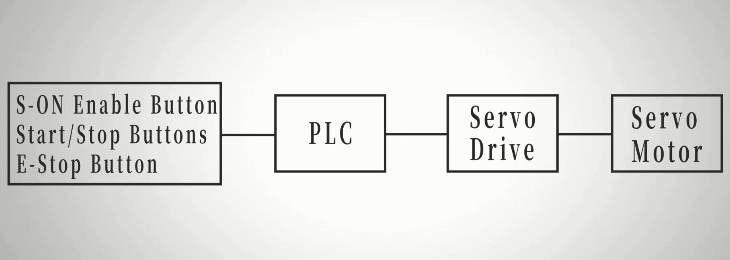
The main difference from a conventional servo system is that the S-ON signal remains continuously active through servo drive configuration without requiring an external enable command.
IV. How to Wire the Servo System?
The wiring connects the PLC, servo drive, servo motor, and safety circuits to achieve continuous servo enable operation.
Main Wiring Connections:
- Control buttons → PLC inputs
The start, stop, and motion buttons send control commands to the PLC. - Emergency stop + S-ON circuit → PLC
The emergency stop button is connected in series with the S-ON enable circuit to ensure safe shutdown. - S-ON signal → Servo drive CN3 Pin 7
After parameter configuration, the servo drive remains enabled continuously. - PLC pulse output → Servo drive → Servo motor
The PLC sends pulse commands, and the servo drive controls motor movement.
Servo Drive Connections:
- Power supply: L1/L2, control power: L1C/L2C
- Motor output: U/V/W + Ground
- Encoder feedback: CN4 connector
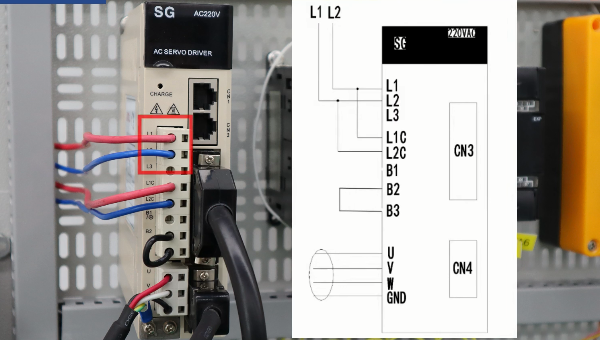
Protection Circuits:
- CW limit relay: Prevents forward overtravel
- CCW limit relay: Prevents reverse overtravel
- Alarm reset relay: Resets servo faults safely
Proper wiring allows the servo system to keep S-ON continuously ON while maintaining motion control and safety protection.
V. How to Configure Servo Drive for Continuous S-ON?
The servo drive parameters need to be adjusted before operation.
- Step 1: Set Position Control Mode
Access parameter Pn000 and configure the drive for pulse train position control.
Recommended setting: Pn000 = n.0010 →This enables position control based on pulse input signals. - Step 2: Configure Input Signal Allocation
Next, modify the input signal settings.
Set: Pn50A = n.2101 →This enables user-defined input signal allocation.
Then configure: Servo ON (/S-ON) = n.2171 →This setting keeps the servo continuously enabled during operation.
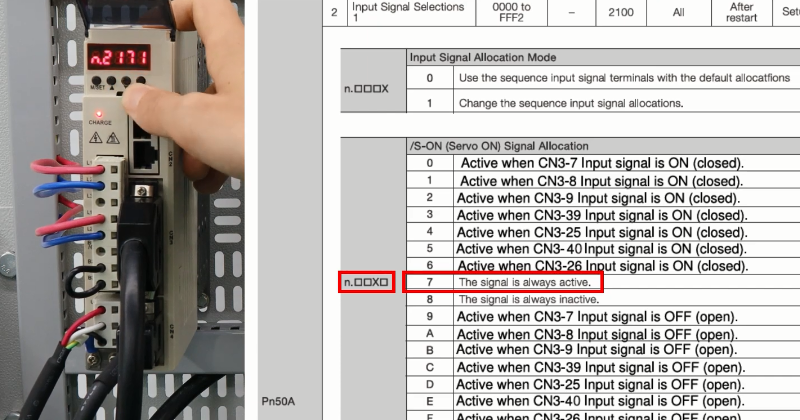
After saving the parameters, the servo drive is ready for continuous S-ON operation.
VI. How Does PLC Program Control Motion?
After servo configuration, the PLC ladder program manages movement commands.
1. Typical Control Logic:
Clockwise Rotation
Press the CW button:
- PLC outputs pulse signals.
- Servo motor rotates clockwise.
Counterclockwise Rotation
Press the CCW button:
- PLC changes pulse direction.
- Motor rotates counterclockwise.
Stop Function
Press STOP:
- PLC stops pulse output.
- Motor stops movement.
he PLC sends a 20,000 Hz pulse train for CW and CCW movement control in the test system.
2. Limit Protection Logic:
- KA1 (CW limit) → stops CW pulses.
- KA2 (CCW limit) → stops CCW pulses.
- KA3 (alarm reset) → resets drive faults via panel button.
VII. What Should Be Noted When Using Continuous S-ON?
Keeping S-ON always ON does not mean the motor runs continuously. The servo motor only moves when pulse commands are received.
Important points:
- Ensure emergency stop functions correctly.
- Confirm PLC logic can interrupt pulse output.
- Verify limit protection before operation.
During testing, the servo drive remains enabled even after pulse input stops, while the motor stops because motion commands are removed.
VIII. Conclusion
Keeping the servo S-ON signal continuously ON is an effective way to simplify PLC servo control and improve system response in applications requiring frequent positioning operations. By configuring the servo drive parameters correctly, optimizing PLC pulse control logic, and maintaining reliable emergency stop and limit protection circuits, the system can achieve stable motion control while ensuring operational safety.
For a complete demonstration of process and actual operation, watch the detailed video at the end of this article. ATO online store provides a range of PLC servo motors and servo control solutions designed for industrial automation applications. Explore ATO servo motors, servo drives, and related motion control products to find suitable components for building precise and efficient servo systems.
