
Stepper Motor Drive Troubleshooting
A stepper motor drive controls the movement of a stepper motor and plays an important role in CNC machines, 3D printers, and automated equipment. When a drive fails, the motor may stop responding, lose position, vibrate excessively, or stall under load. Most stepper motor drive problems can be traced to power supply issues, incorrect wiring, control signal errors, unsuitable parameter settings, or drive protection. This article covers common faults, practical troubleshooting steps to help identify the cause and restore normal operation.
I. Quick Diagnosis
Start by observing exactly what happens when the system receives a motion command. Different symptoms help narrow the troubleshooting process.
| Symptom | Possible Areas to Investigate |
| Motor doesn't move at all, no response | Power supply, enable signal, drive protection |
| Motor runs but loses steps or positions inaccurately | Current, control signals, microstepping, interference |
| Motor runs in the wrong direction | Phase wiring, DIR signal, broken signal wire |
| Motor vibrates or makes loud noise | Resonance, wrong phase wiring |
| Motor has power but lacks torque, stalls under load | Load, acceleration time, supply voltage |
| Drive alarm LED flashing | Check by LED code |
These symptoms are diagnostic clues. Several different problems can produce similar behavior, so the next step is to verify the suspected cause.
II. Common Faults
Fault 1: Stepper Motor Not Responding
The stepper motor shows no response upon power-up, remaining idle.
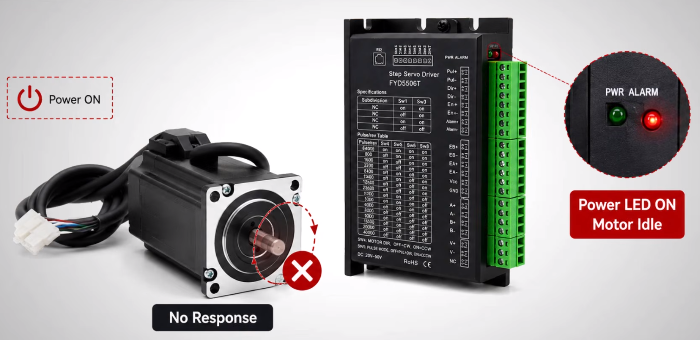
Possible Causes:
- No power or incorrect input voltage.
- Loose power connections or incorrect polarity.
- Enable (EN) signal is inactive.
- The drive has entered a protection state.
Solutions:
- Check the power supply. Verify the input voltage with a multimeter and compare it with the drive's rated range. Inspect the power terminals for loose connections and incorrect polarity.
- Verify the enable signal. Check whether the EN input is at the required logic level and whether the PLC or controller is sending the correct signal.
- Check for alarms. Record the LED indication and consult the drive manual to identify the fault.
- Reset only after correcting the cause. If the manufacturer permits a power reset, disconnect the supply before restarting the drive.
- Restart. Disconnect power completely for 30 seconds and then reboot. This often clears temporary errors.
Fault 2: Motor Loses Steps or Positioning Accuracy
The motor moves but does not reach the expected position, or its movement becomes inconsistent.
Possible Causes:
- Drive current is too low for the motor and load.
- Pulse frequency, voltage, or width does not meet the drive requirements.
- Microstepping settings do not match the controller's pulse calculations.
- Electrical interference distorts control signals.
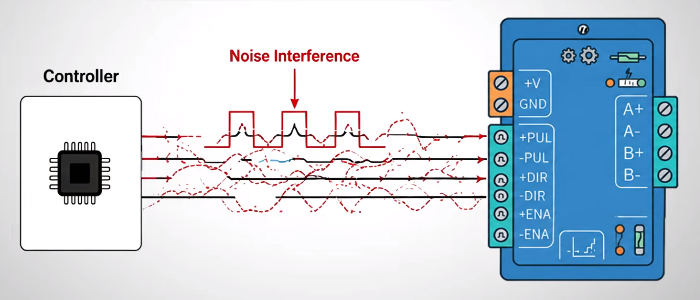
Solutions:
- Correct the current setting. Check the motor nameplate and configure the drive according to the motor and drive specifications. Do not exceed the permitted current.
- Verify the pulse signal. Check PUL and DIR signal wiring, voltage, frequency, and pulse width. Use an oscilloscope if the signal quality is uncertain.
- Match the microstepping settings. Confirm that the controller's pulse-per-revolution calculations agree with the drive configuration.
- Reduce signal interference. Separate control cables from motor power cables and follow the manufacturer's shielding and grounding recommendations.
Fault 3: Motor Vibrates but Does Not Rotate Normally
The motor vibrates, makes unusual noise, or fails to rotate smoothly.
Possible Causes:
- Incorrect motor phase wiring.
- Motor resonance at certain speeds.
- Unsuitable microstepping settings.
- Acceleration or deceleration is too abrupt.
Solutions:
- Check the motor wiring. Disconnect power and verify the A+, A−, B+, and B− connections against the wiring diagram.
- Test different speeds. If vibration occurs mainly within a particular speed range, resonance may be involved.
- Adjust microstepping. Test a suitable alternative setting if supported by the stepper motor drive.
- Increase acceleration time. Use a smoother motion profile to reduce abrupt changes in speed.
Fault 4: Motor Rotates in the Wrong Direction
The motor rotates opposite to the commanded direction.
Possible Causes:
- Direction signal logic is reversed.
- DIR signal wiring or configuration is incorrect.
- Motor phase connections do not match the wiring diagram.
Solutions:
- Check the direction command. Verify the DIR logic in the PLC or motion controller.
- Inspect signal wiring. Check the DIR connection and confirm that the signal meets the drive's timing requirements.
- Verify motor phase connections. Compare the wiring with the manufacturer's diagram and correct any errors with the power disconnected.
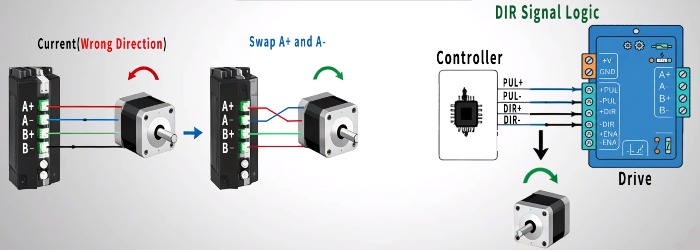
If the motor rotates smoothly but consistently in the wrong direction, the controller's direction logic may be the only setting that needs adjustment.
Fault 5: Motor Stalls During Acceleration or Under Load
The motor runs at low speed or without a load but stalls when accelerating or driving the machine.
Possible Causes:
- Mechanical load exceeds the available motor torque.
- Acceleration time is too short.
- Supply voltage is insufficient for the required operating speed.
- Motor or drive is incorrectly sized for the application.
Solutions:
- Check the load. Verify that the motor provides sufficient torque for the mechanical system. Consider a higher-torque motor if necessary.
- Increase acceleration time. Reduce the torque demand during startup by using a smoother acceleration profile.
- Measure the supply voltage. Check for voltage drops under operating conditions and verify the power supply capacity.
- Review component sizing. Confirm that the motor and drive are compatible and suitable for the required load and speed.
Never increase the supply voltage beyond the drive's specified limits.
Fault 6: Stepper Motor Drive Triggers an Alarm
The drive displays a fault indication or repeatedly enters protection mode.
| Alarm Indication | Possible Fault | How to Fix It |
| 1 red + 1 green | Overcurrent or short circuit | Check motor wiring, cables, winding resistance, and possible short circuits |
| 2 red + 1 green | Motor winding open circuit | Inspect cable connections and check winding continuity |
| 3 red + 1 green | Input overvoltage | Measure the supply voltage and investigate voltage surges |
| 4 red + 1 green | Input undervoltage | Check the input voltage, power supply capacity, and voltage drops |
| 5 red + 1 green | Phase loss | Inspect loose or disconnected motor phase wires |
| Other patterns | Possible overheating or other faults | Check the drive manual, current setting, load, and ventilation |
LED alarm patterns vary by drive model. Always refer to the manual for the specific drive to identify the correct fault code.
Tip: Disconnect power before inspecting or changing wiring. Correct the cause of the alarm before resetting the drive. If the alarm persists after the basic checks, follow the manufacturer's troubleshooting procedure or seek professional inspection.
III. How to Troubleshoot Efficiently
When a stepper motor drive malfunctions, follow a systematic troubleshooting process to identify the cause and avoid unnecessary adjustments or component replacement.
- Check the Indicators: Observe the drive's status indicators and check for any fault codes or warning signals, if available. Refer to the drive manual to interpret them correctly.
- Assess the Load: Check whether the mechanical load is within the motor's capabilities and whether excessive load may be causing stalling or missed steps.
- Set the Current Correctly: Verify that the drive's current setting matches the motor's specifications.
- Prevent Signal Interference: Check whether control signal cables are properly shielded and routed away from power cables.
- Inspect the Wiring: Verify motor phase connections, cable integrity, and grounding.
- Verify Power and Signals: Confirm that the input voltage is within the drive's rated range and that the EN, PUL, and DIR signals meet the drive's requirements.
- Manage Torque and Speed: If the motor stalls during acceleration or under load, review the acceleration time and operating speed. Ensure the motor and drive provide sufficient torque for the application.
After making adjustments, test the system under normal operating conditions to confirm that the problem has been resolved. If the fault remains, further testing may be needed to determine whether the issue lies in the motor, drive, wiring, or another part of the system. Repair or replace faulty components as necessary, following the manufacturer's recommendations.
IV. Conclusion
Stepper motor drive problems can often be traced to power supply faults, incorrect wiring, control signal errors, unsuitable parameter settings, excessive loads, or overheating. A systematic approach helps narrow down the fault, reduce unnecessary downtime, and keep your motion control system running reliably. For a visual demonstration of common faults and their solutions, click the video link below to watch it.
Choosing the right components and configuring them correctly are just as important as troubleshooting. Visit ATO onlien store to explore industrial automation products and find solutions for your motion control needs.
